# Remove Proxmox Subscription Notice
##### Whenever a Proxmox node is updated we need to remove the subscription notice, as it gets overwritten during the upgrade process. I do this only as a time-saving method.
[](http://bookstack.korys.lan/uploads/images/gallery/2023-06/proxmox-subscription.png)
[](http://bookstack.korys.lan/uploads/images/gallery/2023-06/proxmox-subscription.png)
#### Option 1
---
1\. Change to the working directory
```bash
cd /usr/share/javascript/proxmox-widget-toolkit
```
2\. Make a backup
```bash
cp proxmoxlib.js proxmoxlib.js.bak
```
3\. Edit the file
```bash
nano proxmoxlib.js
```
4\. Locate the following code (Use ctrl+w in nano and search for “No valid subscription”)
5\. Find the following line to edit
```javascript
.data.status.toLowerCase() !== 'active') {
```
and change the not (!) operator to look like the following
```javascript
.data.status.toLowerCase() == 'active') {
```
[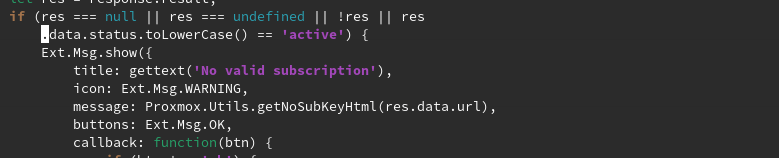](http://bookstack.korys.lan/uploads/images/gallery/2023-06/proxmox-sub-js.png)
6\. Restart the Proxmox web service (also be sure to clear your browser cache, depending on the browser you may need to open a new tab or restart the browser)
```bash
systemctl restart pveproxy.service
```
#### Option 2
---
1\. Change to the working directory
```bash
cd /usr/share/javascript/proxmox-widget-toolkit
```
2\. Make a backup
3\. Edit the file
```bash
nano proxmoxlib.js
```
4\. Locate the following code (Use ctrl+w in nano and search for “No valid subscription”)
```javascript
Ext.Msg.show({
title: gettext('No valid subscription'),
```
5\. Replace “Ext.Msg.show” with “void”
```javascript
void({ //Ext.Msg.show({
title: gettext('No valid subscription'),
```
6\. Restart the Proxmox web service (also be sure to clear your browser cache, depending on the browser you may need to open a new tab or restart the browser)
```bash
systemctl restart pveproxy.service
```
#### Additional Notes
---
If you ever need to revert back you can either copy the backup file and replace the edited version or reinstall the WebKit
Revert from backup:
```bash
mv proxmoxlib.js.bak proxmoxlib.js
```
Reinstall Webkit:
```bash
apt-get install --reinstall proxmox-widget-toolkit
```